
 العربية
 中文
 Türkçe
 Français
App updates
What’s new this week in Taccoin Wallet
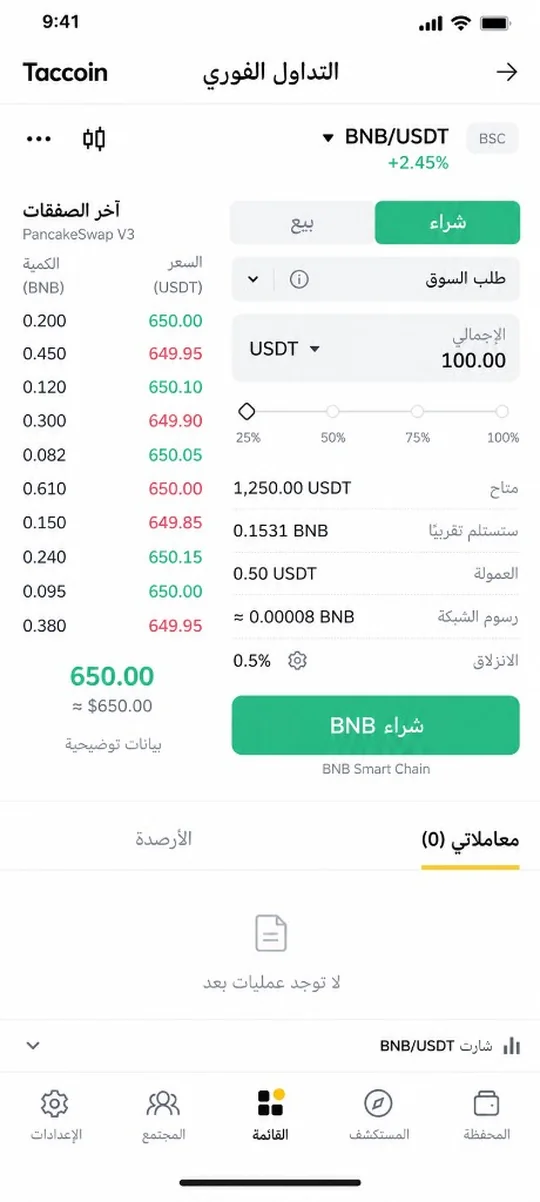
This week we focused on in-wallet trading and on making clear what happens to your funds. The app stays self-custody: keys remain on your device.
Spot trading — in the open
Buy and sell against USDT on BNB Smart Chain through a DEX aggregator (0x, then LiFi). It is not a custodial exchange and not an in-app order book. The fee is shown before you confirm, and every fill is a BscScan transaction.
Full write-up: How spot trading works.
Markets and chart
From Market or from the pair name on spot and chart you open the coin list. Eight visible coins show a price; favorites keep their price even in search. The chart is native public-market candles inside the app.
Receive and notifications
Receive works across supported networks. Choosing USDT on TRON locks the network so it cannot be switched by mistake. Admin can send notifications to the phone and the in-app inbox, using the Taccoin icon.
Community and manage coins
Attach a photo to a post from the second icon, and the profile sheet is clearer for name and photo. Manage coins is back as before: enable a coin on the wallet without trading prices.
Current app version: 1.0.21. Download from the official download page.